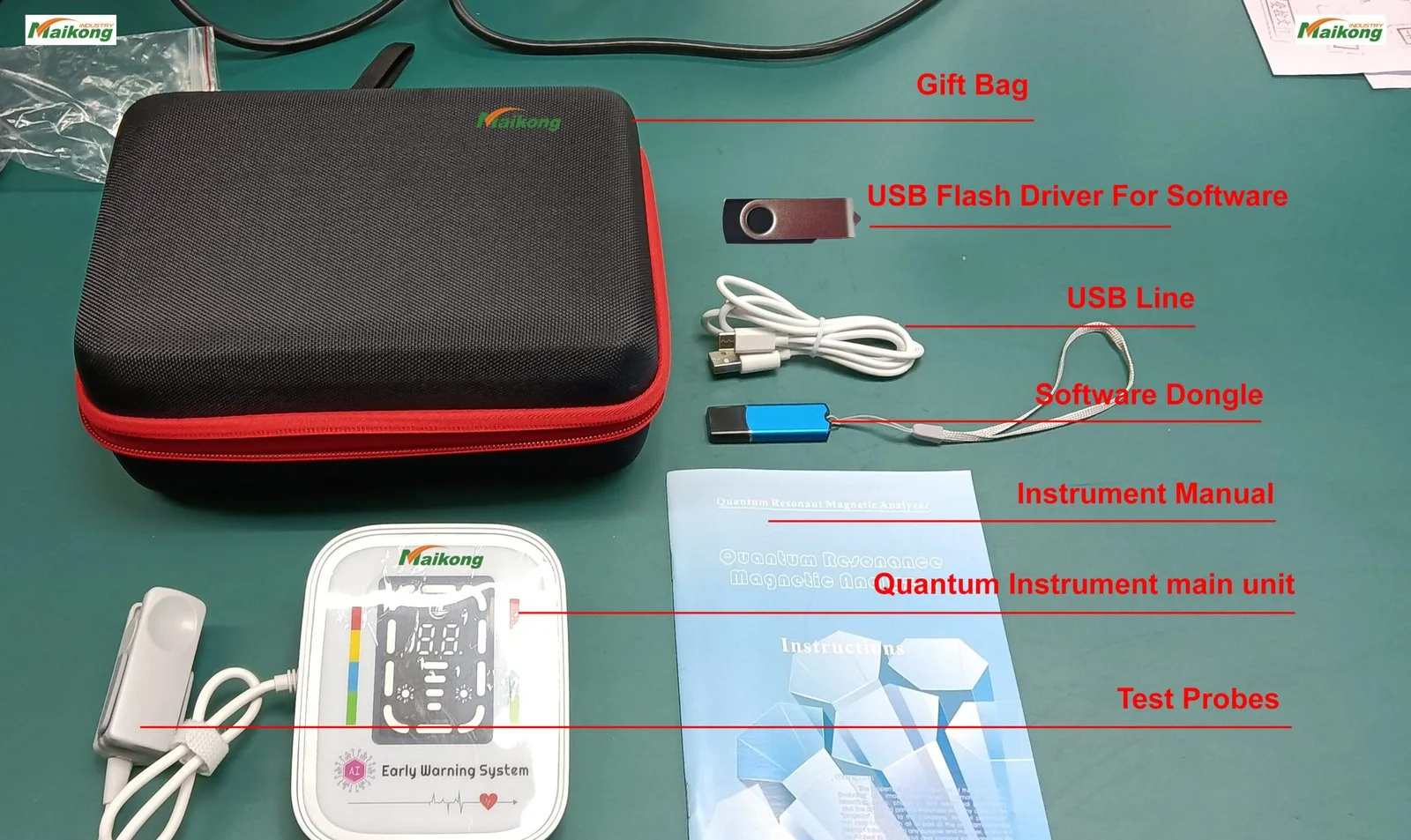
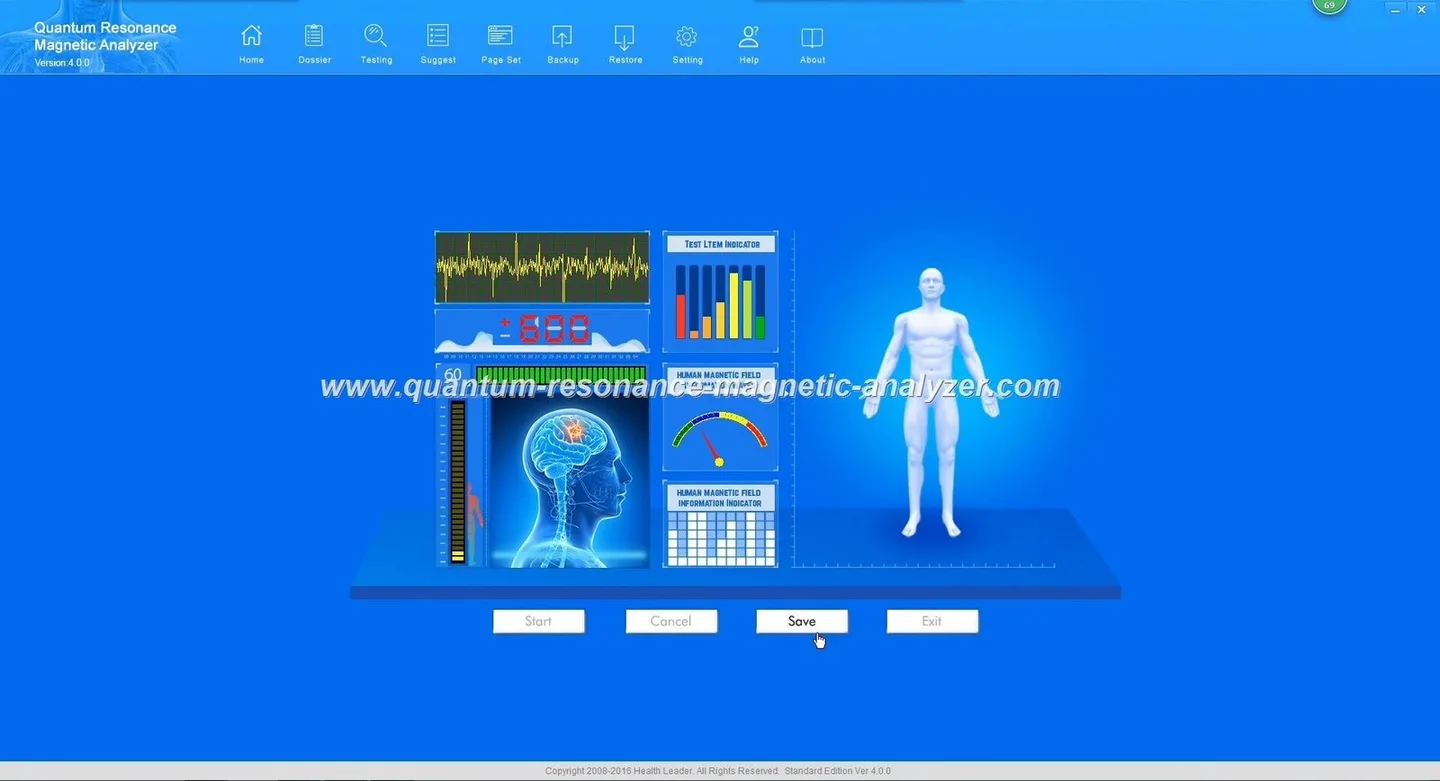
How to Use the MAIKONG Quantum Analyzer MK001 in Nigeria: Preconditions, Step‑by‑Step Operation and Common Misuses to Avoid · body
Quick answer
We confirm that MAIKONG’s Quantum Analyzer MK001 can be used by wholesalers and their buyers in Nigeria as a non‑invasive wellness screening tool when installed with the supplied Quantum Analyzer Software 2026 on a compatible Windows PC. Before operation you must verify the PC meets the supported Windows versions, provide stable power (UPS recommended), set up a quiet, vibration‑free workstation, and follow the model manual for sensor attachment and scanning. The device is for health management and screening; it is not a substitute for medical diagnosis. (See product facts and practical checklist below.)
Contents
Evidence and product facts you can rely on
Key product details we rely on for this guide are from MAIKONG’s product record for the Quantum Analyzer MK001 and its software:
Additional company information (MAIKONG’s statement): the MK001 is supplied with multilingual software, lifetime free software upgrades (per company policy), and generates a 41‑item wellness report (company reported). For software details and report examples see our Quantum Resonance Magnetic Analyzer Software page.
Preconditions before operating the MK001 in Nigeria
Legal and use framing
We stress: the MK001 is intended for wellness screening, health management and educational use. It must not be presented as a definitive diagnostic or therapeutic device. Wholesalers should make this clear to buyers and display the device’s intended use in demo materials and sales contracts.
Site and environment
Choose a dry, dust‑controlled room with stable ambient temperature and minimal electromagnetic interference. Avoid placing the unit next to heavy machinery, large fluorescent ballasts, or other strong magnetic sources. For mobile demonstrations (market stalls, outreach), select a flat, stable surface and protect the unit from rain and direct sunlight.
Power supply
Nigeria’s mains can vary. We recommend a UPS or line‑conditioning device between mains power and the MK001 + PC to avoid data corruption during voltage dips. Our product record does not list country‑specific wiring or voltage adapters; if local electrical adaptation is required, use a qualified electrician and follow local safety codes.
Inventory and lead time
Minimum order quantity (MOQ) is 1; standard lead time from our stock is 2–3 Days (data-fact-id=”118″). For multiple units or OEM customisation ask for a written quote.
Required PC and software checklist
How to Use the MAIKONG Quantum Analyzer MK001 in Nigeria: Preconditions, Step‑by‑Step Operation and Common Misuses to Avoid · body
Before you ship or demo an MK001, confirm the buyer’s PC meets the following baseline:
Operating system: any of Windows xp / 7 / 8 / 10 / 11 as listed by MAIKONG (data-fact-id=”118″). Note: if a buyer uses an unsupported OS (macOS, Linux, Chrome OS), the supplied software will not run natively.
Basic hardware: recent dual‑core CPU, 4GB+ RAM, and available USB ports (preferably USB 2.0 or 3.0). A lightweight modern laptop with Windows 10 is a practical choice for clinics and mobile teams.
Storage: 10–20MB free for software; extra space for client reports (recommended 1GB for long‑term storage per workstation).
User accounts and licenses: ensure the PC has a local Windows account with Administrator rights for software installation. Keep license keys and any activation files secure—do not share them publicly.
Licensing note: the MK001 uses the Quantum Analyzer Software 2026. Confirm with our sales team whether the buyer needs per‑machine activation or a network license; do not assume transferable licenses.
Work surface: stable desk at sitting height with at least 60cm clear depth for the PC and MK001 module.
Seating: comfortable chair with armrests for the client; the client should be still during scanning.
Cable routing: route USB and power cables to avoid trip hazards; use cable ties and adhesive anchors for mobile setups.
Vibration and isolation: place the MK001 on a non‑slippery mat and avoid putting it on top of vibrating surfaces (e.g., refrigerators).
Hygiene: keep single‑use alcohol wipes to clean probe housings between clients following the cleaning guidance at our maintenance page: Cleaning & maintenance.
Step‑by‑step operation
The exact controls and prompts come from the supplied user manual; the following is a practical, generic workflow wholesalers can include in buyer training packs.
1. Hardware and power up
Place the MK001 and the PC on the prepared workstation. Connect the device to the PC via the supplied USB cable and connect power to the MK001 and the PC/UPS.
Switch on the UPS (if used), then the PC, then the MK001 per manual instructions. Allow the PC to complete boot and confirm the MK001 is detected by Windows (check Device Manager).
2. Launch the software
Log into Windows with an administrator or operator account and launch Quantum Analyzer Software 2026. If this is the first run, complete any activation prompts and accept local privacy settings for client files.
3. Client intake
Obtain basic client consent and demographic data, and explain the screening scope: the device provides a wellness screening report, not a medical diagnosis.
Ask the client to remove large metal objects (watches, belts), stay seated and relaxed, and to follow any breathing or posture instructions that appear on the software.
4. Sensor attachment and scan
Follow the supplied manual for exact sensor attachment. Typical steps include confirming the probe or interface is clean and making secure contact as the manual prescribes, then using the software’s Start/Scan control to begin the session. Monitor for software prompts and save the session to the client record once complete.
5. Save and discuss results
Save the report to a named client folder. Use the software’s report pages to show the client non‑clinical wellness indicators and trend graphs where available. Avoid interpreting the report as a diagnosis; suggest follow‑up with a licensed clinician for any significant concerns.
Interpreting MK001 output and permitted uses
MAIKONG supplies the MK001 with report formats intended for screening and wellness tracking. We report that the system generates a 41‑item report (company statement). As wholesalers you should train buyers to use reports for:
Wellness screening and lifestyle advice (e.g., highlighting areas for further testing).
Tracking trends over time with repeat scans.
Client engagement tools in clinics, spas and wellness centres—used as an educational conversation starter, not a clinical conclusion.
Do not allow marketing that represents the MK001 as providing definitive diagnoses, replacing laboratory or imaging tests, or guaranteeing treatment outcomes.
Data handling and software licence guidance
Protect client files and software keys as follows:
Store client reports on a secure folder with Windows user controls and regular backups. Use full‑disk encryption where available and enforce strong passwords for operator accounts.
Control access to software activation keys and keep a secure record of license transfers. Clarify license scope with our sales team before transferring software between machines.
Comply with local data‑protection rules when holding client personal health information; anonymise records where appropriate for marketing and training use.
Routine maintenance and cleaning basics
Daily: wipe probes and surfaces with alcohol wipes between clients, check cables for fraying, and keep the device covered when not in use.
Overclaiming diagnosis: do not market the MK001 as a diagnostic or treatment device. We require that buyers communicate the device’s screening role clearly.
Using without a compatible PC or correct Windows version: the software supports Windows xp/7/8/10/11 (data-fact-id=”118″)—running the wrong OS will prevent operation.
Poor client briefing: failing to obtain consent or to explain limitations leads to confusion and potential reputational risk.
Ignoring power conditioning: operating through unstable mains without a UPS risks data loss and hardware damage.
Troubleshooting checklist (quick)
No device detected by Windows: check USB cable, try a different USB port, confirm device power, and check Device Manager for driver errors.
Software won’t start: run as Administrator, check Windows updates and.NET prerequisites, and verify the license activation status.
Poor scan quality: re‑clean probe contacts, ensure client is still, and eliminate nearby electromagnetic sources.
Saved reports won’t open: confirm you are using the same software version (Quantum Analyzer Software 2026) or export PDF copies for compatibility.
Example quick SOP wholesalers can give buyers (first demo & training)
Use this one‑page SOP for demos:
Power up UPS → PC → MK001. Confirm Windows and device connectivity.
Open Quantum Analyzer Software 2026, create a demo client, and read the consent script aloud.
Wipe probe, briefly show how to attach probe per manual, run a single demo scan, save report as PDF, and walk through three key report pages.
Emphasise limits: “screening only—advise medical follow‑up if results are abnormal.”
Answer buyer questions on warranty (1 Year) and lead time (2–3 Days) and offer a configuration quote if they want multi‑unit pricing.
Risks and limitations
The MK001 and its software are supplied for non‑diagnostic screening and health management. We do not claim the device provides clinical diagnosis, treatment, or guarantees of medical accuracy. Specific country electrical installation guidance for Nigeria is not included in our product record; consult a local qualified electrician for mains adaptation. For medical interpretation or clinical decisions, users must refer clients to licensed healthcare professionals.
This information is intended for health equipment wholesalers and their customers in Nigeria as a practical operational guide. The MK001 is for wellness screening and educational use only; it does not replace professional medical diagnosis, treatment or advice.
This content is provided for learning, information sharing and professional communication only. It is not medical advice and is not a basis for treatment or diagnosis. Confirm suitability, operation and purchasing requirements against the product manual, local regulations and qualified professional guidance.
If you would like a configuration quote, training pack or sample demo scripts tailored for clinics or mobile outreach in Nigeria, email lucy@quantumanalyzer.ng or contact us on WhatsApp/phone at +8613510907401. We can prepare a written quotation including UPS recommendations and optional licence‑management terms.